

How to Submit an IT Support Ticket
Last updated: Sep 25, 2026
31
views

Need IT Help? Here's How to Open a Ticket
Two easy ways to get in touch — use whichever's more convenient in the moment.
Option 1: Submit it right from Slack
Already in Slack? No need to leave it to get help.
- Type /happy in any message box.
- Pick Create Ticket from the menu that pops up.
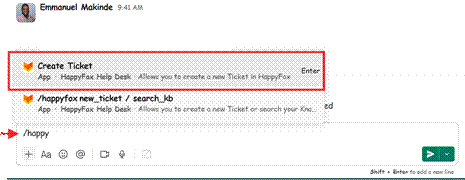
Typing /happy in Slack brings up Create Ticket.
- Fill in the form that appears and hit submit.
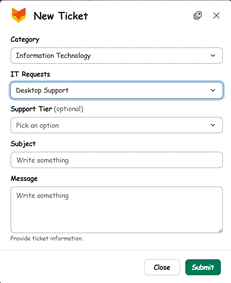
Ticket form opened inside Slack
- You'll get replies and updates right in that same Slack thread.
Option 2: Ticket request through Pulse; The Organizations Intranet
- Log in to Pulse using your company credentials.
- On the Top Right, Select Tell Jarvis the appropriate service category.
- Describe your request, include any relevant details, such as the user, location, device, or application involved.
- Attach any supporting screenshots or documents, if applicable.
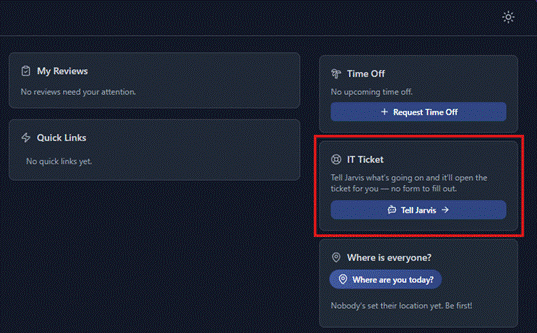
Submit the ticket and keep the ticket number for reference.
Option 3: Go straight to the HappyFox portal
On your browser , search https://help.t45labs.com/home and sign in with SAML, It should take you to Jumpcloud and sign in 6
Either way lands in the same place — just pick whatever's easiest for you right now.
Internal ref: ORG-WI-GEN-001 (v0.2)

